
How to Review Drawing Revisions for Flooring Takeoffs
Drawing revisions arrive the day before bid. How you review them decides whether the bid holds its margin or absorbs missed scope.

Amruta Naik
You have spent three days on the takeoff. Every finish code cross-referenced against the finish legend, every transition counted from the door schedule, every ASTM reference traced back to the specification. The bid is due tomorrow morning at 10 AM. At 4 PM today, an email lands with Addendum Number 3. You open it, scan the narrative, and see it references six revised sheets and two revised specification sections. You have two options. Option one: skim the revision clouds, update the two or three obvious quantity changes, and move on. Option two: run a structured revision review that treats Addendum Number 3 the way it deserves to be treated, which is as a document that just changed your bid whether you notice or not. Estimators who consistently protect their margin on complex commercial work all pick option two, even at 4 PM the day before bid. Estimators who lose money on bids consistently pick option one, and the bidding math on option one gets worse every time an addendum arrives late in the cycle.
That is the fundamental thing to understand about drawing revisions. They are not optional updates you can glance at and dismiss. They are formal document changes that supersede everything issued before them, and they routinely carry scope changes that a rushed cloud-scan will miss entirely. A flooring change from carpet to LVT in a corridor. Flash cove added in patient bathrooms that were originally standard cove base. New stair nosings on levels three through five. Updated transition details at every unit door. A revised specification section requiring moisture mitigation across the whole slab. Any one of these hidden in a single addendum can turn a profitable bid into a losing project, and the difference between catching them and missing them is not talent. It is workflow.
This guide walks through the different revision types every commercial flooring estimator encounters, the professional workflow for reviewing revisions systematically, common mistakes that turn missed revisions into field disputes, and how the Unicalibre REVISE method delivers repeatable revision discipline on every commercial bid.
If you are pricing a commercial project right now and an addendum just landed the day before bid, upload your plans and get a fast takeoff quote and let a disciplined revision review protect the bid.
What Reviewing Drawing Revisions Actually Requires
Reviewing drawing revisions for commercial flooring takeoffs is the disciplined workflow of identifying, tracking, and applying every scope change issued by the design team through addenda, revision clouds, delta symbols, Architect's Supplemental Instructions (ASI), bulletins, and revised specifications, and updating the takeoff to reflect the current design intent before the bid is submitted. Every revision has the potential to change quantities, materials, labor, or installation methods, and revisions supersede all prior documents in the contract set. Unicalibre Estimating is architect-led, applies a structured revision review on every commercial takeoff, and every deliverable is peer-reviewed before it goes out.
The reason revision review is a discipline rather than a task is that revisions rarely announce their full impact clearly. A single revised finish code on the finish schedule can change materials in dozens of rooms. A revision cloud in one enlarged bathroom detail can add flash cove scope across an entire clinical wing. An updated specification section can add moisture mitigation on every slab in the building without touching a single floor plan. Estimators who scan revision clouds and update only the obvious changes miss the cascade effects that live in the drawings the cloud did not directly touch. Estimators who run the full workflow catch the cascade every time.
A complete deliverable reflects that discipline. Unicalibre Estimating provides peer-reviewed commercial flooring takeoffs delivered in native software formats including MeasureSquare, RFMS, Bluebeam, PlanSwift, Callidus, and Stack, with a BOQ that reflects the current addenda state, marked-up plans identifying every revision-driven scope change, scope notes documenting which addendum drove each change, and a deliverable your team can import and adjust without re-entry.
Request a risk-free pilot takeoff on a project with active addenda and see what a disciplined revision review captures.
The Revision Types Every Estimator Encounters
Construction documents evolve throughout the bid and construction cycle, and revisions arrive in several distinct forms. Understanding what each one is and how it affects your takeoff is the foundation of disciplined review.
Addenda are formal document changes issued by the design team during the bid period, before contract award. They can modify plans, specifications, finish schedules, and any other contract document, and they supersede everything issued before them per standard contract precedence. Addenda typically come with a narrative cover memo describing what changed, followed by the revised drawings, specification sections, or schedules. Read the narrative first, always. It tells you which disciplines and sheets to review.
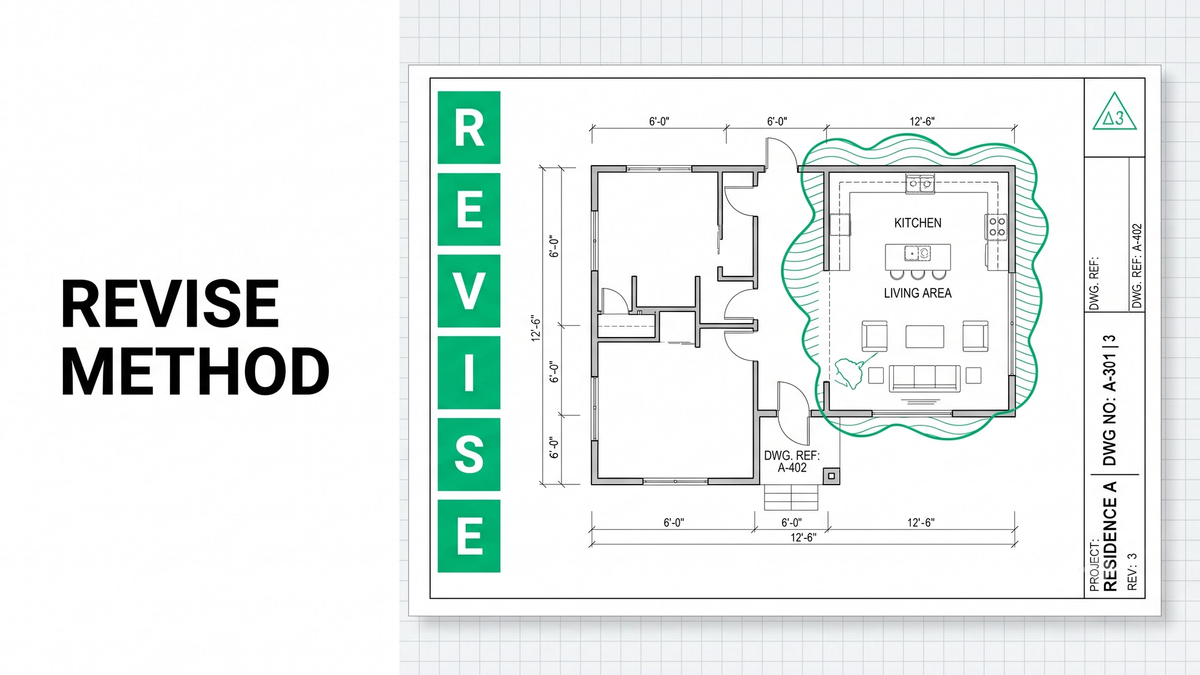
Revision clouds are the visual markers on drawings that identify where changes have been made. A revision cloud is a wavy elliptical boundary drawn around the modified area, typically accompanied by a delta symbol identifying which revision it belongs to. Clouds are useful signposts, but they are the beginning of the review, not the end. A cloud on the finish schedule showing a changed finish code affects every room where that code appears, whether those rooms have clouds around them or not.
Delta symbols are the numbered or lettered triangular markers that identify the revision number. They appear next to revision clouds and in the drawing title block. Delta 1 identifies the first revision, delta 2 the second, and so on. Cross-checking delta symbols is how you verify you are working from the latest version of every sheet. A drawing without delta symbols in the title block is either the original issue or has not been updated for any addenda, and either interpretation matters.
Architect's Supplemental Instructions (ASI) are typically issued after construction begins to clarify design intent or make minor modifications that do not significantly change the contract value. Although ASIs are more common during construction than bidding, they can affect flooring installations by revising details, materials, or sequencing. On projects where construction has started while other bid packages are still in procurement, ASIs may be part of the current design intent.
Bulletins and SK (sketch) drawings are supplemental documents used to communicate project changes across multiple disciplines. Bulletins often package multiple related revisions with a coordinated narrative. SK drawings are informal sketches used to clarify design intent between formal drawing revisions. Both can carry scope changes that affect flooring, particularly at trade coordination points like transitions, expansion joints, and elevator lobbies.
The Professional Workflow: The Unicalibre REVISE Method
A disciplined revision review runs the same six steps every time. Missing a step is where scope goes missing. The Unicalibre REVISE method is the repeatable workflow every commercial flooring estimator can run on every addendum.
R — Read the addendum narrative first. Before opening any revised drawing, read the cover memo. It tells you which disciplines changed, which sheets were revised, which specification sections were updated, and whether the finish schedule was modified. Skipping the narrative means opening drawings without a map. Reading it first means you know what to look for on every sheet.
E — Examine the finish schedule for new finish codes or material changes. The finish schedule is where a single revision can cascade across dozens of rooms. Look for changed finish codes, revised material types, updated base assignments, and new manufacturer notes. Even one revised code affects every room where that code appears. Do not assume clouds around specific rooms capture the full impact.
V — Verify revised floor plans, enlarged plans, and details. Do not limit your review to the revision clouds. Scan the entire revised sheet, because architects sometimes update related content without marking every change with a cloud. Compare enlarged plans and details against the base plan to catch flash cove details, stair nosings, transition profiles, and specialty flooring layouts that only appear in the enlarged views.
I — Inspect the specifications for changes to adhesives, accessories, installation methods, and warranty requirements. Specifications frequently update even when the drawings do not, and a specification change can add substantial labor cost without touching a single floor plan. Look for updated ASTM references, revised adhesive requirements, new moisture mitigation scope, changed accessory schedules, and updated warranty terms.
S — Synchronize the takeoff, reports, and procurement lists so every change is reflected consistently. Do not simply patch the revised areas. Regenerate reports, update the material summary, revise the accessory schedule, and recalculate waste if layouts changed. Fragmented updates create scope drift that shows up as inconsistency in the final deliverable.
E — Evaluate impact on labor, waste, scheduling, procurement, and communication. Ask what the revision changed downstream. Does the new material carry a different lead time? Does the revised layout change roll allocation or seam planning? Does the added scope require notifying the PM before bid submission? Every revision has downstream effects, and the estimator's job is to flag them explicitly rather than absorb them silently.
How Revisions Affect Procurement
Revisions do not just change quantities. They change what has to be ordered, when it has to be ordered, and from which supplier. A revised specification calling out a specific manufacturer and pattern may carry a 12 to 20 week lead time when the original product ran 4 weeks. A revised finish code changing carpet tile to broadloom changes the roll width, the seam plan, and the material handling logistics. A revision adding flash cove in clinical bathrooms adds weld rod, cove former, and cap strip as procurement scope.
Communicate significant revisions to the project manager and procurement team as soon as they are identified. Waiting until final bid submission means the PM discovers the procurement impact after award, when there is no leverage to negotiate the change with the GC.
Common Revision Review Mistakes
Most missed-revision problems trace back to the same handful of habits:
- Scanning revision clouds without reading the addendum narrative first
- Focusing only on clouded areas and missing changes elsewhere on revised sheets
- Skipping the finish schedule and missing cascade effects across rooms
- Ignoring revised specifications that add scope without changing drawings
- Missing enlarged plan revisions where flash cove and stair scope live
- Failing to update accessory schedules and waste calculations
- Working from stale drawings without verifying delta symbols
Pro tip checklist before you resubmit any revised commercial flooring takeoff:
- Have I read every addendum narrative in reverse chronological order?
- Have I verified delta symbols on every sheet I am working from?
- Have I compared the revised finish schedule against my current room list?
- Have I scanned entire revised sheets, not just clouded areas?
- Have I opened every revised enlarged plan and architectural detail?
- Have I read every revised specification section?
- Have I regenerated reports and updated accessory schedules?
- Have I documented which addendum drove each takeoff change?
How the Estimating Models Compare on Revision Discipline
DIY (owner estimating): Revision review gets rushed at the end of the bid cycle when the owner-estimator has the least energy and the most competing priorities. Missed revisions are the norm.
In-house estimator: Better if trained on structured revision review, but a single estimator handling multiple concurrent bids often defaults to cloud-scanning under time pressure.
Per-project outsourcing: Useful for overflow, but a rotating estimator handling only the current addendum without seeing the prior takeoff cannot catch cascade effects that require historical context.
Dedicated FTE estimator: The same estimator every time, running the REVISE method on every addendum, peer-reviewed before delivery, maintaining continuity across the full bid cycle including late revisions. Most reliable on complex commercial work with active design change, typically at a 50 to 60 percent cost reduction versus a domestic in-house hire.
Request a risk-free pilot takeoff on a project with active addenda and see what disciplined revision review captures.
What Changes in the Real World
The pattern repeats across projects with multiple addenda.
A flooring subcontractor in Texas was bidding a healthcare renovation and received Addendum 4 the afternoon before bid submission. The addendum narrative referenced revised finish schedules and specification updates. A structured REVISE review caught a specification change adding moisture mitigation on the entire slab that the drawings never surfaced. Updating the takeoff before submission protected an estimated 10 to 15 percent of contract value that would have been absorbed after award.
A commercial flooring contractor in Phoenix bidding a multifamily project had scanned revision clouds on Addendum 3 but missed a revised finish code on the finish schedule that changed corridor carpet tier across all four buildings. Cross-referencing the revised finish schedule against the room list before submission caught the change and protected an estimated 5 to 10 percent of the flooring package that a cloud-only review would have missed.
A flooring firm in Ontario bidding an office tenant improvement was working from what they believed was the current drawing set and had not noticed that Addendum 2 was missing from their file. Verifying delta symbols across every sheet surfaced the gap, prompted a request to the GC for the missing addendum, and avoided pricing a bid that would have been invalidated the moment submission opened.
Same lesson every time: revision discipline is workflow, not talent. See how a dedicated estimator applies structured revision review to every commercial bid so late addenda do not decide your margin.
What to Send and What You Get Back
A revision-aware flooring takeoff does not require a perfect package. It needs the right inputs.
What you send: architectural plans, the finish schedule and finish legend, interior elevations, reflected ceiling plans, wall sections, architectural details, the door schedule, Division 09 specifications, the general conditions of the contract, every addendum in chronological order (including cover narratives), any ASIs or bulletins issued, and your preferred brands or labor rates.
What you get back: a BOQ or Excel breakdown organized by area and material reflecting the current addenda state, marked-up plans identifying every revision-driven scope change, scope notes documenting which addendum drove each change and the REVISE workflow applied, a material summary reflecting current specifications, and native software files in your platform (MeasureSquare, RFMS, Bluebeam, PlanSwift, Callidus, or Stack) so your team can import and adjust without re-entry.
Timeline: standard turnaround is typically 24 to 48 hours for most trade packages, with same-day rush available when a late addendum arrives. Communication runs over email, phone, and your preferred PM tools, and addenda are tracked as they land.
Want the revision review checklist your team can run on every addendum? Download the checklist.
Frequently Asked Questions
How do I review drawing revisions for a commercial flooring bid?
Review drawing revisions using a structured workflow: read the addendum narrative first to identify which disciplines and sheets changed, compare the revised finish schedule against the current room list, verify revised floor plans and enlarged plans scanning the entire sheet not just clouded areas, inspect specifications for changes to adhesives and accessories, synchronize the takeoff and material summary consistently, and evaluate downstream impact on labor, procurement, and scheduling. Cloud-scanning alone misses cascade effects that live in unclouded content.
What is the difference between an addendum, an ASI, and a bulletin?
An addendum is a formal document change issued during the bid period, before contract award, that supersedes prior contract documents. An Architect's Supplemental Instruction (ASI) is typically issued after construction begins to clarify design intent or make minor modifications that do not significantly change contract value. A bulletin communicates project changes affecting multiple disciplines and often packages multiple related revisions with a coordinated narrative. All three can affect flooring scope and must be reviewed for takeoff impact.
What do revision clouds and delta symbols mean on construction drawings?
Revision clouds are wavy elliptical boundaries drawn around modified areas on a drawing to identify where changes have been made. Delta symbols are numbered or lettered triangular markers next to revision clouds and in the drawing title block identifying which revision number the change belongs to. Delta 1 identifies the first revision, delta 2 the second, and so on. Cross-checking delta symbols in the title block verifies you are working from the latest version of every sheet.
What flooring scope typically changes in addenda?
Common flooring scope changes in addenda include revised finish codes (which cascade across dozens of rooms), material substitutions (carpet to LVT, tile to sheet vinyl), added flash cove or heat welding scope, new stair nosings and tactile warning strips, revised transition profiles, updated specifications adding moisture mitigation or substrate prep, and revised finish schedules with new manufacturer callouts. Any one of these can materially change the bid.
Can an outsourced estimator handle multiple addenda across a bid cycle?
Yes. Unicalibre Estimating applies the REVISE workflow to every addendum during the bid cycle, maintaining continuity with the original takeoff and updating quantities, scope notes, and material summaries consistently. Every revised deliverable is peer-reviewed before it goes out, and native software file delivery in MeasureSquare, RFMS, Bluebeam, PlanSwift, Callidus, or Stack means your team can adjust the revised takeoff without re-entering data.
Revisions Are Not Optional
Great commercial flooring bids do not treat drawing revisions as end-of-cycle patchwork. They treat every addendum as a formal design change that supersedes everything before it, and they apply the same structured review to Addendum 4 that they applied to the original document set. Read the narrative first, examine the finish schedule for cascade effects, verify revised drawings across the entire sheet, inspect specifications for changes the drawings do not show, synchronize the takeoff and reports, and evaluate downstream impact on labor and procurement. The Unicalibre REVISE method is the repeatable workflow that turns late addenda from margin threats into scope decisions the estimator controls.
Bid season does not wait, and complex commercial projects are exactly where late-cycle revisions cost the most. A disciplined, peer-reviewed, architect-led process runs REVISE on every addendum, documents every change against its driving revision, and delivers a bid that reflects the current design intent rather than a stale interpretation from three revisions ago.
Book a call and send your plans for turnaround and pricing. Review the revisions with discipline, protect the margin, and stop letting late-cycle addenda decide your bid.